
- Blog
- Hiring & cost
- Remote Executive Assistant: What They Do, Cost and How to Hire
Remote Executive Assistant: What They Do, Cost and How to Hire


Table of contents
- What does a remote executive assistant do?
- Executive assistant vs virtual assistant vs administrative assistant
- How much does a remote executive assistant cost?
- When an in-house executive assistant is the better choice
- How do you hire a remote executive assistant?
- Can a remote EA work in your time zone?
- What skills should a remote executive assistant have?
- Frequently asked questions
- The bottom line
If your inbox runs your day, you don’t need more discipline. You need an executive assistant.
Quick answer: A remote executive assistant (EA) manages your inbox, calendar, travel, meeting prep and follow-ups from outside your office, usually during your business hours. In the US, an in-house executive assistant earns a median of $76,590 a year before benefits, while a full-time remote EA from a managed company costs roughly $12,000 to $43,000 a year, depending on the provider and where the assistant is based. Start by delegating your inbox and calendar, give access through shared tools rather than passwords, and judge success by the hours you get back.
I’ve worked as a virtual assistant for 16 years, mostly supporting executives in other countries. This guide covers what a remote EA does, what one costs and how to hire one without the usual false starts.
What does a remote executive assistant do?
A remote executive assistant does the same job as an in-house EA, minus the desk outside your office. The US Bureau of Labor Statistics describes executive assistants as people who provide high-level support for an office and for top executives, including reviewing incoming documents, doing research and preparing reports.
In practice, a good remote EA owns these areas:
- Inbox management. Sorting, drafting replies in your voice and flagging the few emails that actually need you. (See how email management virtual assistants work.)
- Calendar control. Booking, rescheduling, protecting focus time and making sure no meeting lands without an agenda. This is where most executives feel the difference first, and it’s why calendar management is usually the first thing we hand over.
- Travel. Flights, hotels, ground transport, visas and an itinerary in one place, with backups when plans change.
- Meeting prep. A one-page brief before each important call: who you’re meeting, the last conversation, open items and what you want out of it.
- Follow-ups. Notes, action items and chasing people so nothing slips after the meeting ends.
- Gatekeeping. Deciding who gets time with you, politely saying no and routing requests to the right person on your team.
- Projects. Event planning, vendor research, board packs and the small projects nobody else owns.
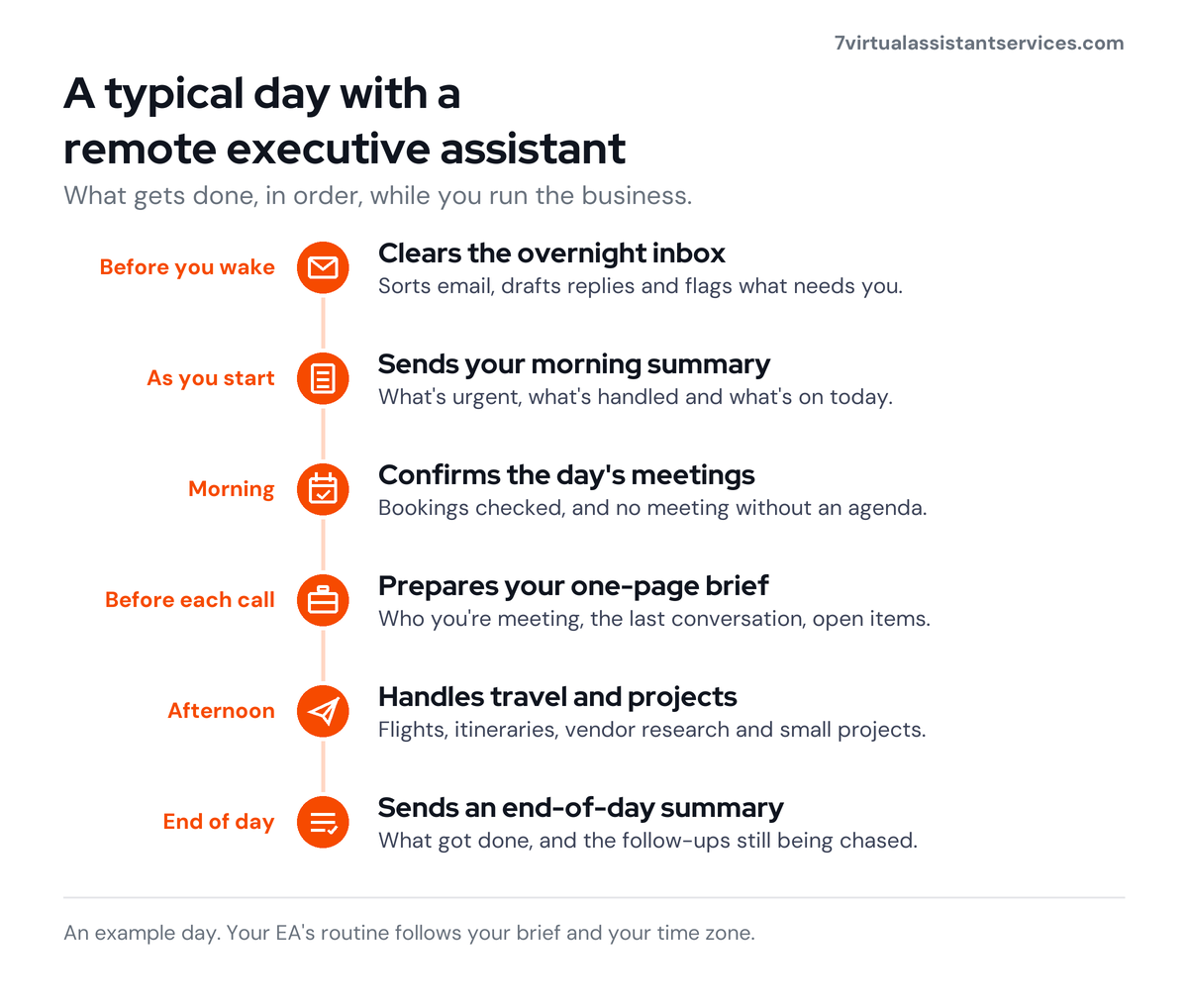
A typical day for a remote EA might start with clearing overnight email before you wake, sending you a short morning summary, confirming the day’s meetings, preparing briefs, then spending the afternoon on travel and project work.
Executive assistant vs virtual assistant vs administrative assistant
People use these titles loosely, which is why hiring goes wrong. The difference comes down to who the person supports and how much judgment they’re trusted with.
| Executive assistant | Virtual assistant | Administrative assistant | |
|---|---|---|---|
| Who they support | One senior leader (or a small leadership team) | A business owner, team or several people | A team, department or office |
| Typical work | Inbox, calendar, travel, meeting prep, gatekeeping, projects | Anything that can be done online: admin, email, data entry, social media, customer service | Filing, data entry, scheduling, phones, office supplies |
| Decision-making | High: acts on your behalf | Varies with the brief | Low to medium: follows set processes |
| Where they work | In office or remote | Remote | Usually in office |
| US pay benchmark | $76,590 median (BLS) | Priced per hour or per month by provider | $48,310 median for all secretaries and admin assistants (BLS) |
A virtual assistant describes where someone works. An executive assistant describes who they work for. So a remote executive assistant is simply a virtual assistant trained and trusted to support one executive closely.
The administrative assistant vs executive assistant question is about scope. An admin assistant keeps an office or team running. An EA protects one person’s time and often speaks for them. Robert Half’s 2027 Salary Guide reflects this gap: a mid-point of $73,000 for executive assistants and $52,000 for administrative assistants. If you need general office support rather than one-to-one help, a virtual administrative assistant is usually the better fit.
How much does a remote executive assistant cost?
This is where remote EAs change the maths for small and mid-sized businesses.
The cost of an in-house EA
The BLS puts the median US salary for executive secretaries and executive administrative assistants at $76,590 a year (May 2025). That’s before benefits.
For office and administrative support workers, US employers pay $11.51 an hour in benefits on top of $25.22 in wages, so total cost runs about 1.456 times salary. Apply that to the EA median and an in-house executive assistant costs about $111,544 a year (our calculation).
Then add hiring. SHRM puts the average cost per hire for non-executive roles at $5,475, with a median of 39 days to fill. Desk space, equipment and the months it takes a new hire to learn your preferences come on top.

The cost of a remote EA from a managed company
Managed companies charge a flat monthly fee for a set number of hours. The assistant is recruited, trained and managed for you. Here’s what full-time or near full-time executive support costs across the market, from published pricing pages checked on 31 October 2026:
| Type of company | Monthly price | Hours a month | Annual cost |
|---|---|---|---|
| 7VAS Full Time | $999 | 160 | $11,988 |
| Offshore senior EA plans | $2,400 | 160 | $28,800 |
| Premium EA companies | $3,000 to $3,600+ | 160+ | $36,000 to $43,200 |
If you want a US-based EA for fewer hours, expect to pay about $65 an hour ($2,600 for 40 hours), and some US providers don’t publish their executive assistant prices at all. Those services suit leaders who want a North American assistant and are happy to pay for it.

Our Full Time plan at 7VAS is $999 a month for 160 hours, about $6.24 an hour. That’s roughly 89% less than the salary and benefits of a median US executive assistant, by our calculation. Every plan includes a dedicated VA, a trained backup VA, a QC reviewer and an account manager, with no recruitment fees and no lock-in. See our price plans for what each plan covers.
Price isn’t the whole story. An EA who needs constant correction costs you more time than they save, so ask every provider who checks the work and who covers sick days.
When an in-house executive assistant is the better choice
I’ll be straight with you: a remote EA isn’t right for every executive.
Hire in-house if:
- You need a chief of staff, not an assistant. If the role involves running leadership meetings, making strategic calls, managing people or representing you in rooms, that’s a senior in-house hire.
- Your work is mostly physical. Greeting visitors, handling paper mail, managing an office or running errands in person needs someone on site.
- You’re in a regulated role where data can’t leave a particular country or network, and your compliance team won’t sign off on remote access.
Plenty of executives end up with both: a senior person in-house and a remote EA handling the inbox, calendar and travel underneath. That split often frees the in-house person to do the strategic work you hired them for.
How do you hire a remote executive assistant?
Here’s the process I recommend, whether you hire through a company like ours, a freelancer marketplace or directly.
1. Decide what to delegate first
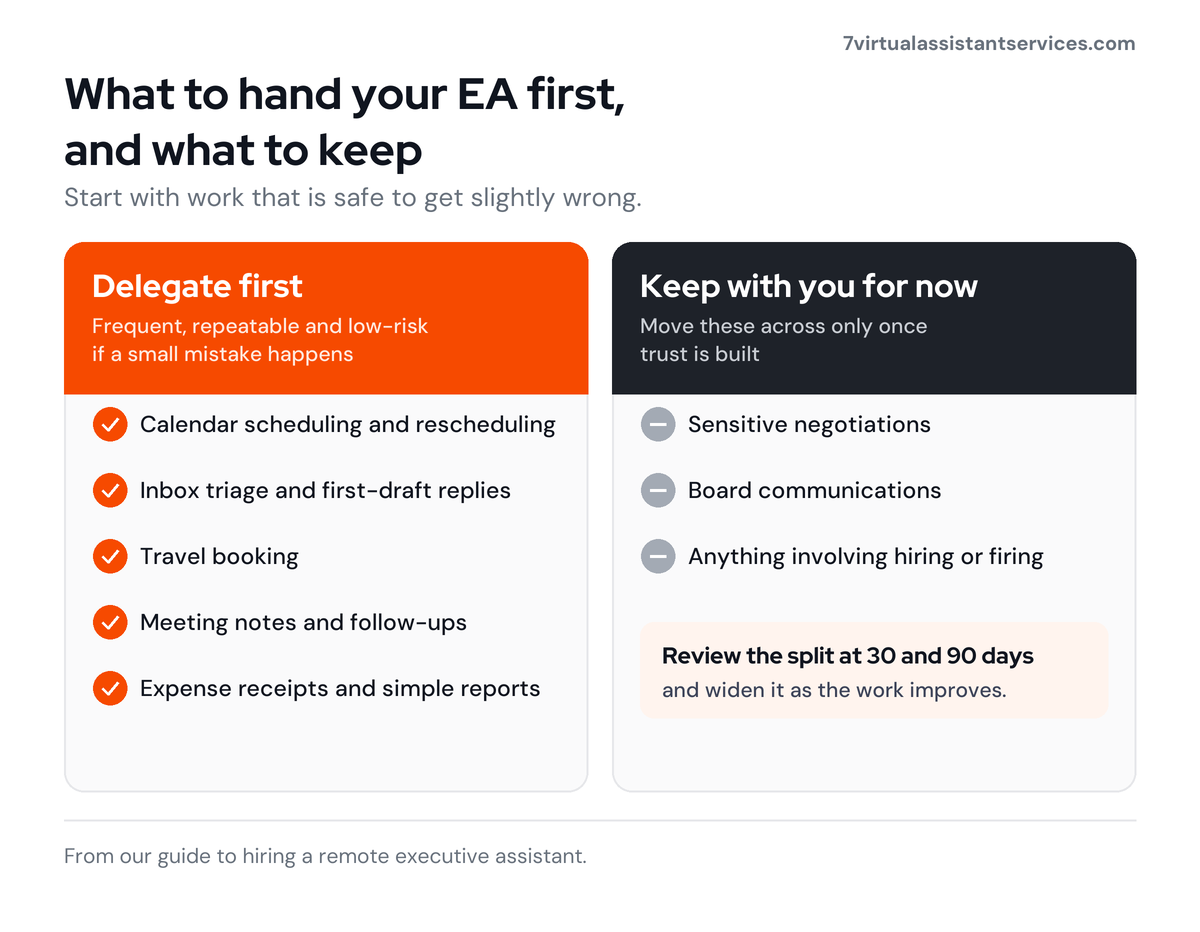
Start with work that’s frequent, repeatable and low-risk if a small mistake happens:
- Calendar scheduling and rescheduling
- Inbox triage and first-draft replies
- Travel booking
- Meeting notes and follow-ups
- Expense receipts and simple reports
Keep sensitive negotiations, board communications and anything involving hiring or firing with you until trust is built. For more ideas, here’s our list of tasks you can outsource to a virtual assistant.
2. Set up access and security properly
This is where most people cut corners. Don’t.
- Never share your own password. Use delegated access instead: Google Workspace and Microsoft 365 both let you give someone access to your mail and calendar under their own login.
- Use a password manager with a shared vault for the logins your EA genuinely needs, so you can revoke access in one click.
- Turn on two-factor authentication for every account your EA uses.
- Give the minimum access needed, then widen it as the work grows.
- Get an NDA signed before day one. At 7VAS, every VA signs an NDA and works inside the client’s own systems, so your data stays in your accounts.
3. Follow a 30-day onboarding plan
The first month decides whether the relationship works. Here’s a simple plan:
| Week | Focus | What you do | What your EA delivers |
|---|---|---|---|
| Week 1 | Access and observation | Share access, a list of key contacts and your preferences (meeting times, travel class, tone of voice) | Takes over the calendar; sends a daily end-of-day summary |
| Week 2 | Inbox | Agree labels and rules; review drafted replies before they’re sent | Triages the inbox daily; drafts replies for approval |
| Week 3 | Meetings and travel | Hand over upcoming trips and recurring meetings | Prepares meeting briefs; books travel; tracks follow-ups |
| Week 4 | Projects and review | Hand over one small project; hold a 30-minute review | Sends replies in your name for agreed categories; proposes improvements |
Write things down as you go. A shared “how I like things done” document saves repeated explanations and lets a backup assistant step in quickly.
4. Measure whether it’s working
Pick three or four measures and check them at 30 and 90 days:
- Hours you get back each week. Track your own admin time for a week before and a week after.
- Response time on emails that matter.
- Scheduling errors, such as double bookings or missed meetings.
- Number of things you had to redo. This should fall every month.
If your EA is still asking the same questions after a month, the problem is usually the brief, not the person. Fix the documentation before you change the assistant.
Can a remote EA work in your time zone?
Yes. India-based and Philippines-based VAs routinely work their clients’ business hours, whether that’s New York, London, Dubai, Singapore or Sydney. For US clients, that means working through the Indian or Philippine night.
Time zones can even work in your favour. With nearly a third of meetings now spanning multiple time zones, according to Microsoft, an assistant who starts a few hours before you can clear the inbox and prepare the day’s briefs before you log on.
Agree a few hours of overlap with your day for live calls. You can read more on our India-based and Philippines-based VA pages. If you need an EA who can also handle Spanish, French, German, Arabic, Portuguese or Chinese, look at bilingual virtual assistants.
What skills should a remote executive assistant have?
The BLS lists decision-making, interpersonal, organizational and writing skills as the important qualities for secretaries and administrative assistants. For a remote EA, I’d add:
- Clear written English, since most of your contact will be by email and chat.
- Good judgment about what’s urgent, what can wait and what needs you.
- Discretion. They’ll see everything in your inbox.
- Tool fluency in Google Workspace or Microsoft 365, plus Zoom, Slack, a password manager and your CRM.
- Proactive communication: telling you about a problem before you discover it.
At 7VAS, our team VAs have at least 2–3 years of experience before placement, and we also have highly experienced VAs with 5 to 7+ years. We match executive clients with assistants who’ve supported senior people before. If you’re weighing up the wider case, here’s why smart CEOs are hiring virtual assistants instead of full-time staff.
Frequently asked questions
What does an executive assistant do?
An executive assistant gives high-level support to a senior leader: managing their inbox and calendar, booking travel, preparing for meetings, following up on actions, screening requests and running small projects. The BLS describes the role as providing high-level support for top executives, including reviewing documents, doing research and preparing reports.
What is the difference between an executive assistant and a virtual assistant?
“Executive assistant” describes who someone supports, usually one senior leader, with a lot of trust to act on their behalf. “Virtual assistant” describes where they work, which is remotely. A remote executive assistant is both: a virtual assistant dedicated to supporting one executive closely.
Administrative assistant vs executive assistant: which do I need?
An administrative assistant supports a team or office with scheduling, filing, data entry and phones, following set processes. An executive assistant supports one leader and makes judgment calls for them. In the US, the BLS median is $48,310 for all secretaries and administrative assistants and $76,590 for executive assistants (May 2025).
How much does a remote executive assistant cost?
A full-time remote EA from a managed company costs about $12,000 to $43,000 a year, based on published prices on 31 October 2026: $999 a month for 160 hours at 7VAS, and $2,400 to $3,600 or more at other managed companies. US-based EAs cost more, about $65 an hour.
How much does an executive assistant earn?
In the US, executive secretaries and executive administrative assistants earned a median of $76,590 a year in May 2025, according to the BLS, and Robert Half’s 2027 guide puts the mid-point at $73,000. In the UK, Robert Half’s median is £47,000, and in Australia the median starting salary is A$115,000 before super.
What skills should a remote executive assistant have?
Look for strong written English, good judgment about priorities, discretion, organization, and fluency with Google Workspace or Microsoft 365, video calls, chat tools and a password manager. The BLS lists decision-making, interpersonal, organizational and writing skills as key qualities for the profession.
Can a remote EA work my time zone?
Yes. India-based and Philippines-based executive assistants commonly work their clients’ business hours in the US, UK, UAE, Singapore and Australia. Agree a few hours of overlap with your day for live calls, and an EA who starts before you can have your inbox cleared by the time you log on.
The bottom line
A remote executive assistant gives you back the hours you lose to email, scheduling and follow-ups, at a fraction of the $111,544 a median in-house EA costs once benefits are added. Keep strategic, chief-of-staff work in-house, delegate the repeatable work first, set up access safely and give the first 30 days real structure.
If you’d like a dedicated executive assistant with a trained backup and a QC reviewer behind them, our virtual assistant services start in 48–72 hours, month to month, and we’re rated 5.0 on G2. You can compare plans on our pricing page, or read about our virtual personal assistants if you need help with personal admin too.

John Peter D
John has worked as a virtual assistant for 16 years and founded 7VAS to give small businesses a dedicated VA with the cover and quality checks he wished his own clients had. His team works from Chennai, India, with Philippines-based VAs and bilingual English–Spanish teams in Brazil and Chile, supporting 200+ clients across the US, UK, UAE, Singapore and Australia.


